![[Logo]](gif/logo.gif)
Another command is used to define the Operating mode of the CY545. It is:
O Mode..Set CY545 operating mode
The parameter of the Mode command is stored in an 8-bit internal CY545 register. These bits are only accessible by the Mode command, not through any external I/O lines, such as the User Bits. Each bit of the Mode command register controls a CY545 feature, as shown below:
MB7 ....Select ASCII command
mode if set, else Binary
MB6 ....Select serial baud rate if
set
MB5 ....Enable CTS/ signal on USRB6
if set (CY545A and later)
MB4 ....Display position during Jog
& Home cmd if set
MB3 ....reserved
MB2 ....Select HP Display if set &
MB0 = 1
MB1 ....Select CY325 based display
if set & MB0 = 0
MB0 ....Select parallel display if
set, else serial
The Mode command will define the values for all 8 bits of the register at once, so you must be careful not to affect the value of one feature while changing the value of another. The default value for the mode register is 80H at power up. This selects the ASCII command mode with standard serial display output for the query and string commands.
![[Figure 9.1]](gif/545-20.gif)
The most significant bit selects between ASCII command mode and Binary command mode. When the bit is set, ASCII mode is selected, and when the bit is clear, Binary mode is selected. When you use Binary command mode, you must first issue an O command in ASCII mode that turns off the upper bit, to put the CY545 into Binary mode. All commands following the O command are then in the special Binary format:
O 0<cr>.....ASCII command to select Binary mode
........... All following commands in Binary format
When MB4 of the mode register is set, the CY545 will display the current position while stepping in the Home command or while stepping from a JOG signal input. This position display may have some effect on the step rate of the command, since additional time is required during each step to display the position.
The lower three bits, MB0, MB1, and MB2, are used to select what device will be used to display query outputs and string value outputs from the CY545. Two basic display choices are a serial display or a parallel display. The least significant bit, MB0, selects between these two options.
When a serial display is selected, the next bit, MB1, selects between a standard serial output, used for connections to a host computer serial port or general terminal serial port, or a specialized LCD display device, controlled by the CY325 LCD Display Controller.
When bit MB1 is zero, a standard serial display is used, and the CY545 does not perform any special formatting of the output. This is the power-on default option.
When MB1 is one, the CY325 based display is used, and the CY545 adds special formatting strings to the data, putting the query results in fixed places on the display screen. This mode should not be used without a CY325 controller. For more information about this device, contact Cybernetic Micro Systems or visit our web site at www.controlchips.com.
When a parallel display is selected by MB0, MB2 selects between a standard parallel output, and a special Hewlett Packard LED display.
![[Figure 9.2]](gif/545-21.gif)
When MB2 is zero, the standard parallel output is selected. This uses the IO_REQUEST and BUSY signals to control the reading of information from the CY545. Also, the CY545 will drive the FPL signal low (shared function with USRB6) when it has something to output. This protocol will work with a standard two-line handshake or with the parallel functions of a CY233 Network controller.
When MB2 is one, the special HP LED display is selected. In this case, all output from the CY545 goes to the local HP LED display, and a special signal, HP_SEL (shared function with USRB7), is generated while the CY545 is writing to the display. More information about support for this display is provided in a later section.
When a Mode command is issued with MB5 set to one, the CY545A enables the CTS/ function on the USRB6 (the CTS function is not available on older parts prior to the CY545A). After any reset, this function is disabled, and USRB6 is high, so the CTS/ signal is off. A Mode command must be issued to the CY545 before the CTS/ function is enabled.
When the signal is low, the CY545 is ready for more serial characters, and when the signal is high, the CY545 is busy processing a command. The CTS/ signal can be used to automatically control the rate of serial communications from the host system, stopping transmissions while the signal is at TTL one. This allows the host to send a sequence of commands, including motion commands that may take some time to execute, without worrying about the CY545 being able to accept the commands. The hardware control insures that the CY545 will always indicate when it is ready for more serial data. The exception to this is during use of the external jog line, in which CTS is not set busy during Jog stepping.
Since the CTS/ signal is initially disabled, the CY545 must receive a Mode command that enables the signal before it can be used by the host. There are three alternatives for turning on the CTS/ function.
First, the Mode command could be read from the local memory, if one is present, as part of the "Auto-Start" rountine. This is probably the best approach, since the CY545 will always reconfigure itself after a reset, without any special action by the host. With this approach, CTS/ can automatically be enabled by the CY545 itself. See the section on External Memory Support (12-External Memory) for more details on the "Auto-Start" function.
If your system does not have the external memory, an alternative approach is to send the Mode command from your host computer. However, this requires some special software, since the CTS/ signal is off when the CY545 is reset. The software must send the Mode command with the CTS monitor function disabled, so that your computer will transmit the command even though CTS/ is off. It can then reconfigure itself to enable CTS monitoring, after sending the Mode command. An example BASIC language CRT emulator program which performs this function is shown in 20-Up & Running.
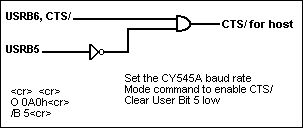
The third alternative for starting the CY545, with CTS/ enabled requires some external hardware plus another User Bit. With this design, the CTS/ signal is always enabled, so the host computer is not required to reconfigure itself, first sending commands without CTS monitoring, then switching to CTS monitoring. When the CY545 is reset, both the CTS/ signal (USRB6) and the second User Bit signal, say USRB5, are high. This forces the CTS/ output from the AND gate to be low, which is the active state. The host computer can now send the Mode comand to enable the CY545 CTS/ function, then it must send a Bit command to drive the second User Bit to zero. The logic will now follow the value of the actual CY545 CTS/ signal, until the CY545 is reset again. For host systems that always require a CTS/ signal, this alternative will work when there is no local external memory from which to automatically execute the Mode command, The circuit and command sequence are shown below:
Finally, if MB6 is one, the CY545 uses the lower four bits of the mode byte value to select the serial baud rate. This allows a parallel command to set the serial rate to a desired value, without tying the I/O Request and Busy lines to a particular state, and allows a parallel command source to set up the CY545 for serial communications, such as showing messages on a serial display.
For this function, the CY545 does not store the mode byte value in its internal Mode register, so if MB6 is set, no other operating modes of the CY545 are affected, only the baud rate selection. Bits MB0 to MB3 are treated as a binary value, selecting the baud rate as shown in the table below:
MB3-MB0 Selected Rate @ 11 MHz
.. 0 ...300
.. 1 ...600
. .2 ...1200
.. 3 ...2400
.. 4 ...4800
.. 5 ...9600
.. 6 ...19200
.. 7 ...57600
.. 8 ...Self
Adaptive (up to 19200 baud)
..9-F.. Undefined
When crystal frequencies other than 11 MHz are used, the fixed rates will be scaled linearly by the crystal frequency, while the self-adaptive rate will attempt to compensate for the new crystal frequency. For most crystal frequencies above 11 MHz, the CY545 can adapt successfully to baud rates of 4800 baud or less, with a small enough error to insure reliable operation of the serial interface. However, at 14.7456 MHz, the CY545 can adapt to all baud rates up to 19,200, plus two non-standard rates of 38,400 and 76,800 baud.
The CY545 will set the baud rate during the execution of the Mode command, and the new rate will be in effect until a hardware reset occurs or another Mode command is issued, with B6 set. When the adaptive rate is selected, the CY545 must receive two carriage returns before the operating baud rate will be defined again, so this selection may only be used if serial data is coming into the CY545. No transmissions will occur until the baud rate is again defined.
00 Contents ..|..
01 Intro ..|..
02 Pins & Packages ..|..
03 Cmd Interfaces ..|..
04 Commands..|..
05 Motor Cmds
06 Bit Cmds..|..
07 Memory Cmds..|..
08 Prog Branch Cmds..|..
09 Mode Cmds ..|..
10 Misc Cmds
11 Circuits ..|..
12 External Memory ..|..
13 Thumbwheel Switch
..|.. 14 Output
Display ..|..
15 Proto Boards
16 Timing & Control
..|.. 17 Rate
Tables ..|..
18 Electrical Specs ..|..
19 Examples ..|..
20 Up & Running
Back to CY545 Data Sheet
© 1988 - 1999 Cybernetic Micro Systems, Inc.
All rights reserved.
CY545 Manual 22MAR99